Clinic booking
Plan sessions, book appointments, check patients in and document from each booking.
Included on every plan, including Free.
For clinics, small medical centres and private practice
Bring bookings, patient records, WhatsApp conversations and AI clinical documents together around each patient.
Free to start. No card needed.
Built by a practising NHS consultant

One patient
Docyment brings that work together around each patient.
A connected clinic day
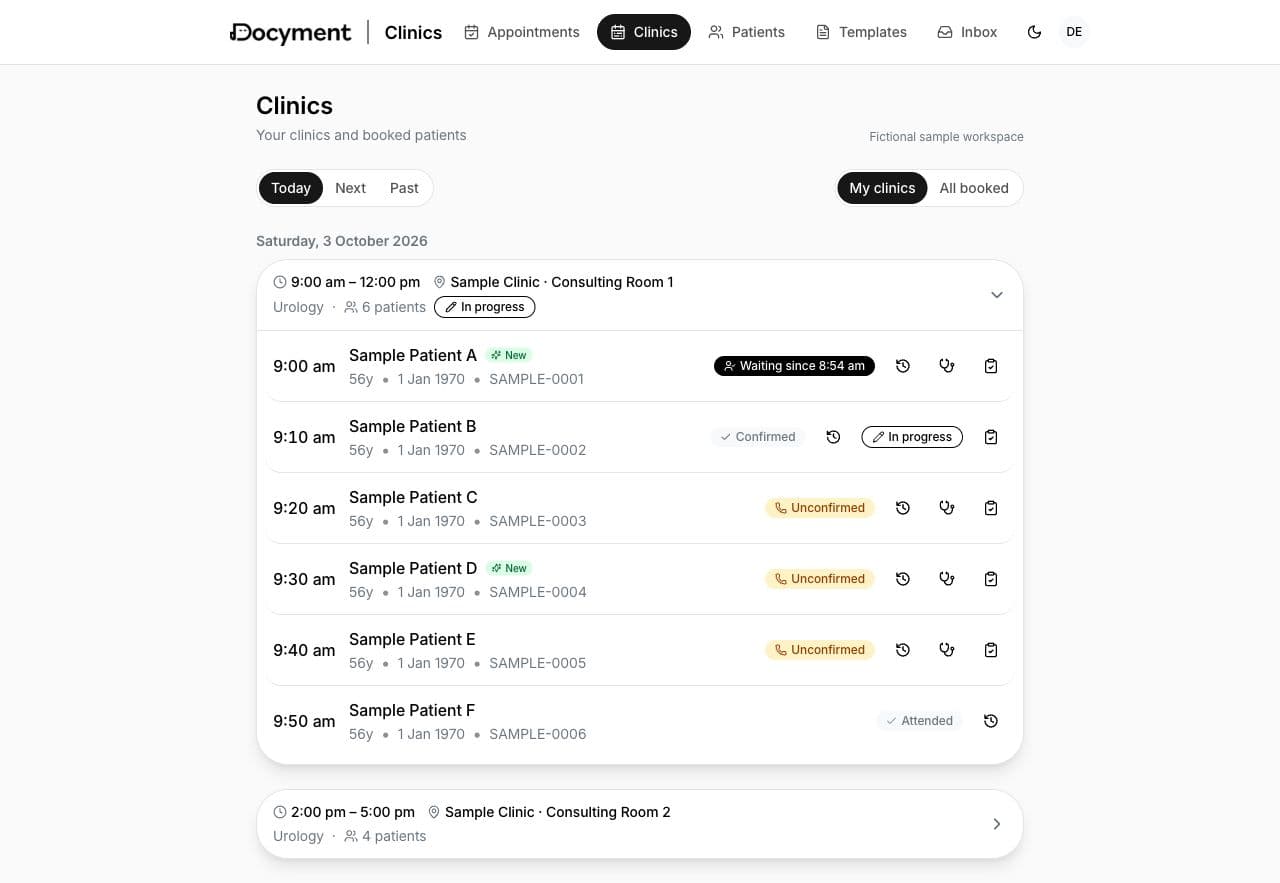
Follow a sample patient through the clinic. The appointment leads into the consultation, and the documents stay with the patient record.
Book appointments into the clinic's sessions. The patient and appointment details stay together.
Check patients in and out. Follow appointment and payment status from the clinic list.
Create a clinical document from the appointment. Dictate, Record, Write or Scan to capture the consultation.
An AI reviewer checks the draft. The clinician reviews and approves the document before it is used.
Saturday, 3 October 2026
6 appointments
Sample Patient A
Sample Patient B
Sample Patient C
Sample Patient D
Sample Patient E
Sample Patient F
Sample Patient A
3. Create Your Letter
Record Consultation
Click to start — transcript appears live as you speak
Letter Review
03/10/2026Your processed letter will appear here
Start by selecting a patient and template to document your encounter
Product previews use fictional sample data. Source-matched previews of the web app. The cursor, recording and transcript are a demonstration; no appointment or document is created.
Practice managers organise sessions, follow appointment status and track recorded payments in the same system.
Plan sessions, book appointments, check patients in and document from each booking.
Included on every plan, including Free.
Keep patient WhatsApp conversations in one shared inbox for your clinic team.
Uses your clinic's own WhatsApp Business number.
One consultation, several documents. AI drafts and checks. You review and approve.
Clinical documents are currently produced in English.
Understand how your clinic is performing. Key figures, together in one place.
Appointments, attendance and fees.
Patient record
Each patient's bookings, messages and clinical documents are kept together, with the source notes alongside each document.
AI clinical documents
One consultation can produce a clinic letter, a referral and a prescription. Choose how you capture it.
Dear Colleague,
Re: Sample Patient ADate of birth: 1 January 1970Patient identifier: SAMPLE-0001
Thank you for referring this patient for a new outpatient consultation.
HistoryThe patient attended to discuss their symptoms and available management options.
AssessmentThe findings were discussed with the patient.
PlanArrange the discussed investigations and a follow-up review of results.
Yours sincerely,Dr Example
Source-matched previews. Fictional sample documents. Nothing is recorded or generated here.
An AI reviewer checks each draft. You review and approve before the document is used.
Use our templates or bring your own. We help set up the formats your clinic uses.
Native iPhone and Android apps, plus the web app. The same account and patient records. Available workflows vary by device.
From our co-founders
 Shady NafieConsultant Urologist and co-founder of DocymentKettering General HospitalLinkedIn
“I built Docyment because I was tired of spending my evenings writing the same clinic letters I'd been dictating all day. I wanted a process that fitted the letters I write and the way I work. It began with the letter and grew to cover the rest of the clinic day.”
A founder's own account, not a customer testimonial.
 Sherif DarwishConsultant Psychiatrist and co-founder of DocymentCEO, Recovery CenterFacebook
“I chose Docyment for Recovery Center because a hospital is a team, and the team needs to work around the same patient. Reception, clinicians and managers each have their own role in one system. It is built by clinicians, and we are bringing our hospital onto it step by step.”
A co-founder whose hospital is a Docyment client. Not an independent testimonial.
Data is encrypted in transit and at rest. We do not use patient data to train AI models. A clinician reviews and approves each document before it is used.
Docyment is for clinics, small medical centres and consultants in private practice. It connects booking, patient records, patient communication and clinical documents, and can start with a clinic of one.
AI clinical documentation is one part of Docyment. The clinic platform also brings together booking, patient records and WhatsApp conversations. One consultation can produce several documents, each reviewed and approved by a clinician.
You can begin alongside your existing clinic software and use your clinical templates. Start with the workflow you need. Any integration with another system needs to be discussed separately.
WhatsApp messaging is switched on for your clinic on request. We arrange activation with you, using your clinic's own WhatsApp Business number. Your team then uses a shared inbox for patient conversations.
Clinical documents are currently produced in English. The clinic platform includes Arabic interface support; language coverage varies by screen and device.
An AI reviewer checks each draft. The clinician reviews and approves the document before it is used. The transcript or notes it was drafted from are kept with it.
Yes. Docyment has native iPhone and Android apps, as well as the web app for desktop work. The apps use the same account and patient records. Available workflows vary by device.
Yes. Clinic analytics covers appointments, attendance and fees. It is switched on for your clinic on request.
Start free. Explore the workflow with your clinic's own templates.